
The usual advice to start with a long list of spelling and punctuation preferences gets the order wrong. To learn how to create an editorial style sheet that lasts, start with the decisions your team keeps making, record who owns them, and test whether another editor can apply them. The result should be a shared decision log, not a second copy of Chicago or APA.
A useful sheet tells writers what to use, tells proofreaders what to check, and gives unresolved questions somewhere to go besides another chat thread.
What to Put on the Sheet First
An editorial style sheet records the choices that govern a particular publication or project. The governing manual supplies the baseline; the sheet records local decisions, exceptions, and terminology that the manual can't settle for you.
That distinction has a practical history. According to the University of Chicago Press's account of its manual, compositors developed an internal style sheet, expanded it into a 21-page Style Book in 1901, preserved a copy in the building's cornerstone in 1903, and published Manual of Style: Being a Compilation of the Typographical Rules in Force at the University of Chicago Press in 1906.
The same history records that the 12th edition's first printing of 20,000 copies sold out before publication, and the edition ultimately exceeded 150,000 copies. The useful lesson isn't to make your sheet longer. It's to maintain a reference that people continue to need as their work changes.
Establish authority before preferences
Write the project's scope at the top of the file: audience, market, governing manual, dictionary, and editorial stage. Identify the publication owner and explain which instructions take precedence when authorities disagree.
For example, a US customer-support guide may use American English and direct second-person instructions, while quoted customer statements retain their original wording. That boundary prevents an editor from treating every visible difference as an error.
Define the work, too. Copyediting may resolve terminology and sentence-level consistency; proofreading checks the approved text and presentation. Don't leave the proofreader to discover that distinction after making unauthorized rewrites.
Copy this starter grid
These are sample house choices, not universal rules. Keep the categories, then replace the decisions with choices your project needs.
Starter editorial style sheet
| Category | Lock this | Example |
|---|---|---|
| Spelling and region | One dictionary and one variety of English | organize, not organise, for US house style |
| Capitalization | Heading case and product-name case | Sentence case for H2s; Lumi Humanizer stays as branded |
| Punctuation | Serial comma on or off | apples, pears, and figs |
| Numerals | When to spell and when to use digits | nine editors, 10 files |
| Dates | Order and month style | Month day, year; spell out the month |
| Units | Symbols or words, plus spacing | 10 km, not 10km |
| Abbreviations | Expand on first use or keep short | SEO stays abbreviated after first mention |
| Headings | Hierarchy and length | One H1, then H2 and H3, no skipped levels |
| Quotations | Quote marks and citation spot | Double quotes; citation follows the closing punctuation |
| Citations | One reference system | Chicago notes, not mixed with APA on the same page |
| Terminology | Preferred names and banned variants | editor, not copy person |
| Voice | Person, formality, contractions | Second person; contractions allowed in guides |
In the working file, add term, status, owner, date, source, and last-reviewed version to every row. Each non-obvious entry also needs a preferred form, rejected variant, short rationale, and sentence showing the choice in context.
Voice needs more than adjectives such as friendly or professional. Use tone in writing to distinguish the reader's situation from the publication's usual voice, then record observable choices such as contractions, direct address, and acceptable technical language.
Practical rule: Leave a query open rather than inventing a preference just to fill a blank cell.
Copy the grid into a shared file before editing. Empty query rows are useful; unsupported rules aren't.
How to Create an Editorial Style Sheet
Build the sheet during a real edit rather than in a separate policy exercise. The Editors Canada professional proofreading standards advise preparing a style sheet when none exists and updating it as proofreading progresses.
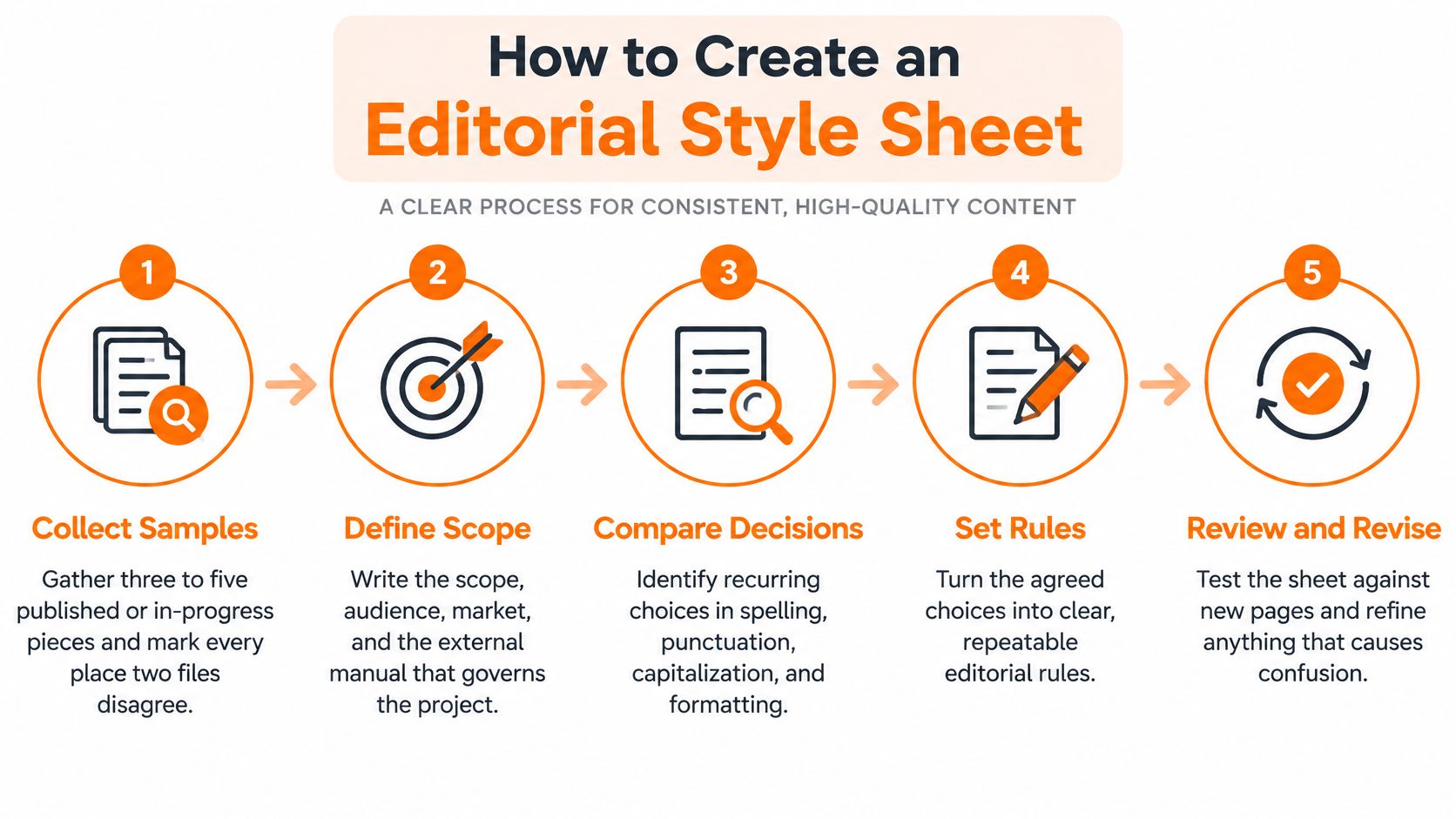
Use the workflow below as a compact map from sample collection to maintenance.
Build from disagreements, not guesses
-
Collect representative pieces. Choose published or in-progress material that includes ordinary prose and difficult formats. For a starter exercise, collect three to five pieces and mark where the files disagree. Don't select only polished landing pages if the team also publishes technical tables and support instructions.
-
Write the project scope. Record the audience, market, governing reference, and authorized level of editing. The external manual should settle anything the sheet leaves silent. A frequent mistake is naming several manuals without deciding which one wins.
-
Sort the disagreements. Use categories for spelling, capitalization, punctuation, numerals, dates, units, abbreviations, headings, quotations, citations, terminology, accessibility, and voice. Keep factual questions separate. Whether a product supports a feature isn't a capitalization decision, even if the question first appears beside a product name.
-
Make each choice usable. Record the preferred form, rejected variant, rationale, and contextual example. Say a draft alternates between sign-in and login. An entry might specify sign in as the verb and sign-in as the adjective, while retaining Login when it reproduces an interface label. Without the interface exception, a well-intended correction could make instructions harder to follow.
-
Read the first pass word by word. Add unresolved cases as queries with a named respondent. Don't automatically choose whichever form appears most often. Frequency can reveal the current habit, but it doesn't establish that the habit is accurate or appropriate.
-
Verify approved changes on later passes. Check that the correction reached every relevant occurrence and didn't damage another construction. Search-and-replace can alter quotations, code, names, or words containing the search string. Inspect replacements in context rather than assuming the operation was safe.
-
Test the sheet against a complete sample. Include headings, tables, links, metadata, citations, and regional or multilingual variants. Promote recurring corrections into permanent rules only after testing them. A sheet built entirely from body copy won't tell a production editor how to handle a table header or translated product label.
Separate cleanup from editorial judgment
When surface errors crowd the query log, use a grammar checker to identify spelling and grammar candidates, then decide which suggestions fit the project. A typo belongs in the manuscript correction, not necessarily in the permanent style sheet.
If citation treatment is in scope, review originality risk with a plagiarism checker before signing off the workflow. A similarity flag needs inspection; it doesn't establish misconduct, and an unflagged passage still needs accurate attribution. Neither grammar checking nor originality review chooses the governing citation system for you.
A proofreading pass should verify approved decisions, not reopen every sentence for stylistic negotiation.
Hand the proofreader the approved sheet with the edited master. If someone requests structural rewriting at that stage, confirm the expanded scope and identify which files need another check.
For a visual companion to the workflow, watch the following video.
Test Rules on a Real Sample
Count variant forms before editing, then repeat the count after applying the sheet to the same sample. A cleaner-looking document isn't enough evidence that the rules are clear: the editor may have made good decisions that nobody else could reproduce.
The Australian Government Style Manual's editing and proofreading guidance supports repeated quality checks and checking copy against agreed requirements. Use a consistency audit to turn those checks into a repeatable editorial routine.
Classify the issue before counting it
Label each recurring item as a rule, exception, factual question, or unresolved query. Choose a canonical form for names, product terms, acronyms, numbers, dates, units, and hyphenation, but keep permitted exceptions in their own field.
Suppose the house term is customer support, while a quoted department name is Customer Care. The quotation is an exception with a defined scope, not evidence that writers may alternate freely. Counting both as violations would make the audit misleading.
Style-sheet audit counts
| Metric | How to measure | If it does not improve |
|---|---|---|
| Violations per 1,000 words | Count banned variants after the edit, divide by sample word count, then multiply by 1,000 | Rewrite or drop the rule that editors still miss |
| Unresolved queries per document | Tally blank rows still open | Owner answers or explicitly defers before proofreading |
| Correction recurrence | Note the same fix in a later file | Promote it to a rule or document the exception |
| Reviewer agreement | Two editors classify one sample | Reconcile the clash before the rule is scaled |
These are diagnostic checks, not universal acceptance thresholds. Define what blocks release: an unresolved product claim may require a hold, while a deferred preference about an optional heading style may not.
Have the editors classify a sample independently before comparing their decisions. If one treats a phrase as an approved exception and the other marks it wrong, inspect the rule's scope and example. Don't settle the disagreement by asking everyone to be more careful.
Check what automation can miss
A grammar-checker workflow can help separate surface corrections from issues that need editorial judgment. It won't establish whether an acronym is appropriate for the audience or whether a product name must retain unusual capitalization.
For academic or technical work, specify the statistical conventions explicitly. State whether reported means include standard deviations, how sample sizes are labeled, and whether p-values appear with the alpha level and effect sizes. The editor should verify the agreed reporting convention, not invent missing statistical information.
Watch for these release problems:
- Undocumented exceptions: A permitted departure exists only in someone's memory.
- Conflicting authorities: Editors can defend opposite changes using different references.
- Terminology drift: New articles introduce synonyms for a locked term.
- Untestable wording: A rule such as make headings engaging gives reviewers no shared criterion.
Ship the version number and change log with the master file. Judge progress by fewer recurring corrections on comparable work, not by a promised percentage improvement.
Inclusive Language and Accessible Structure
Start with a concrete identity-language decision. If a draft says the disabled employee, don't automatically replace it with a supposedly universal preferred term. Establish whether disability is relevant, then use the person's own wording: disabled employee or employee with a disability may be appropriate when that is how the person identifies.
The Hamilton College inclusive language guide provides a basis for respectful identification and avoiding unnecessary descriptors. Turn that principle into a workflow: identify who confirms terminology, which terms need community or subject-matter review, and how the editor records the answer.
Keep identity decisions close to the document being reviewed, rather than isolated in an appendix nobody consults.

Separate shared requirements from local vocabulary
Accurate meaning, respectful self-identification, and accessible structure can apply across a publication. Vocabulary may need market-specific treatment. Record jurisdiction, audience, language, and accessibility context beside high-risk terms so a later rewrite doesn't erase the distinction.
When markets disagree, retain approved alternatives with clear scope rather than choosing a global term merely to simplify search-and-replace. Require human review whenever automated translation or rewriting changes identity-related meaning.
Give proofreaders observable checks
Accessibility rules should describe something a reviewer can inspect:
- Heading structure: Use a single page-level H1 and meaningful H2 and H3 labels without skipped levels.
- Link wording: Replace click here with descriptive wording such as see the citation rules.
- Image responsibility: Name the person who writes and approves alt text, including the treatment of decorative images.
- Media support: Assign responsibility for captions where the media needs them.
- Table markup: Make row and column headers explicit in the published markup, not just visually bold.
- Useful destinations: Keep login, account, and administrative pages out of ordinary article navigation unless the instructions require them.
A visual heading isn't necessarily a semantic heading. Check the published page, especially when a content-management system lets writers imitate headings with large bold text.
For readable prose, require an answer near the beginning and a main idea in each paragraph. Nielsen Norman Group's web-writing guidance recommends scanning aids including headings, highlighted terms, lists, and topic sentences.
Consistency should preserve meaning and access, not force every person or market into identical wording.
Tips for Keeping One Version in Charge
Collecting every preference makes a sheet harder to use. Add an entry only when it changes quality, consistency, risk, or reader understanding; let the governing manual handle ordinary questions.
The Editors Canada discussion of learning to love style sheets reinforces their practical role in recording editorial choices. Make those choices governable by attaching an owner, scope, and review point rather than leaving them as anonymous instructions.
Use a lightweight change path
A surviving rule needs a preferred form, rationale, approved example, prohibited example, scope, owner, introduction date, review date, and escalation path. Keep these in searchable fields, not scattered comments.
Use this change sequence:
- Propose the change. State the problem and show the sentence where the current rule fails.
- Test the replacement. Apply it to representative copy, including existing exceptions.
- Approve deliberately. The named owner accepts, rejects, or returns the proposal with a reason.
- Announce the effect. Tell editors which projects and files the change governs.
- Archive the old wording. Preserve it in a searchable change log without leaving it active.
Use lifecycle states such as proposed, approved, deprecated, and archived. Writers should be able to identify the controlling version from the document header without asking in chat.
Control exceptions without freezing the sheet
Set a project policy that an approved client brief overrides house preferences for that project only, subject to factual, legal, and accessibility requirements. Log the conflict and its scope. An old article isn't authority merely because it was published.
Practical version control for documents helps distinguish the current master from copies and preserve the reason for a change. Restrict approval rights while leaving an easy route for writers to suggest corrections.
For SEO content, make the publication check part of governance: don't commission a new article when an existing page already targets the same primary query, modifier, and intent. Assign each article a primary keyword and closely related secondary terms, then check the proposed angle against the content inventory.
Google's sitelinks guidance recommends informative, compact titles and headings, relevant internal links, and concise anchor text without repetition. A normal article can use two to four useful internal links as a house guideline, not as a quota that justifies irrelevant destinations.
A paraphrase tool can help clarify a sentence while you protect locked terminology. Paraphrasing isn't humanizing or matching house voice: rewriting for clarity and variation doesn't by itself establish the right tone, formality, or sentence rhythm.
Questions to Settle Before the Next Issue
Release the sheet when editors can use it to resolve the disagreements you counted. Don't hold it until every rare case has an entry. A usable approved version, a named owner, and a scheduled review are more valuable than an unfinished encyclopedia.
The practical answer to how to create an editorial style sheet is to make decisions reusable without making them unchangeable. Before the next issue or production batch, settle these questions.
Who may change a rule during a project?
The named owner should approve a mid-project change after testing the replacement on a live page. Archive the old wording when the change takes effect and state whether already edited files need another pass.
Writers and proofreaders can raise a challenge without independently changing the policy. This keeps useful objections visible while preventing competing versions from circulating.
How many rules are enough?
Enough to stop the disagreements your audit identifies. The starter categories provide coverage, but they don't require a permanent entry for every correction.
If an editor can resolve an ordinary spelling question from the governing dictionary, the sheet may need no new line. Add one when the decision is project-specific, repeatedly disputed, risky, or difficult to retrieve.
What if the client brief contradicts the sheet?
Apply the agreed project hierarchy and record the exception beside the affected rule. Capture who approved it and where it applies so the next editor doesn't extend a local exception across the publication.
If the conflict exposes a flaw in the house rule, submit a change proposal separately. Meeting a project requirement and revising house policy are different decisions.
What if compliant copy still sounds stiff?
Then the next edit is voice, not another punctuation rule. Select representative writing samples that demonstrate the formality, sentence shapes, and level of directness the team wants.
Our custom writing styles can use your own examples, or a description of your preferred tone, to keep rewrites closer to that voice. The Starter plan includes 1 custom writing style, Live Chat, and 48-hour email support; Pro includes 3 custom writing styles, while Unlimited includes 10 or more.
Always review the final output before publishing or submitting it, including names, citations, identity language, and locked terms. Treat detector results as one editing signal rather than a verdict, and follow your institution's academic integrity policies when using writing tools for academic work.
Lumi Humanizer helps make AI-generated text sound more natural while preserving its main point, with custom writing styles built from your preferred examples. Visit Lumi Humanizer to refine a draft that already follows your editorial style sheet, then review the rewrite against the approved rules before publishing.