
Clean Paste AI's free path strips invisible Unicode and raw Markdown 100% inside your browser, but this cleanup doesn't by itself remove statistical AI watermarks or guarantee a detector pass. Treat it as clipboard hygiene, not a shortcut to making AI-assisted writing undetectable.
The popular advice to “remove hidden characters so detectors can't find AI text” confuses formatting with authorship. A better reason to clean a paste is concrete: your heading shouldn't show a literal hash, your product name should remain searchable, and a spreadsheet value should match the value you intended.
What Clean Paste AI Removes and What It Leaves
Clean Paste AI is a browser-based text-hygiene tool with optional rewriting, not a conventional AI writer. It's meant for text moving from ChatGPT, Claude, or Gemini into Google Docs, Microsoft Word, a content-management system, or a spreadsheet.
What a clean paste fixes and what it cannot
| Residue | Typical source | What it breaks | Local strip |
|---|---|---|---|
| U+200B zero-width space | AI chat copy | Search misses, odd word breaks | Yes, words stay visible |
| U+202F narrow no-break space | AI chat copy | Spreadsheet and query mismatches | Yes |
| Other zero-width tags | Copied rich text | Layout and database ingestion | Yes |
| Raw Markdown symbols | Chat replies with #, *, or backticks | Literal marks in Docs, Word, or a CMS | Yes, syntax can be stripped |
| Statistical watermark | Token choices during generation | Detector signals, not layout | No, not a character |
The Clean Paste AI about page states that character-level scans and Markdown stripping run 100% inside the user's browser, so free cleaning passes don't upload drafts to its servers. It also distinguishes statistical watermarking from hidden characters and disclaims guaranteed detector bypass or complete removal of statistical sampling watermarks.
Why an invisible character matters
A zero-width space can sit inside a word without looking like an ordinary space. You might see a complete product name on screen while the underlying text contains an extra character, causing an exact search to miss it.
A narrow no-break space presents a different problem. It can look like normal spacing while behaving differently during a spreadsheet comparison or database query. The visible text may seem correct even when the stored string isn't.
Other zero-width tags deserve the same practical treatment: inspect what was found, remove unwanted residue, and test the destination that was failing. Their presence isn't proof that an AI system generated the text.
Syntax isn't the same as formatting
Markdown uses characters to express structure. A hash can indicate a heading, asterisks can indicate emphasis, and backticks can mark code. If the destination doesn't interpret that syntax, readers see the marks instead of the intended presentation.
Stripping those marks doesn't necessarily create native heading styles or preserve rich-text emphasis. You may still need to apply formatting in Word or your CMS.
Practical rule: Strip characters when the words are already right. Make any decision to change the wording separately.
A statistical watermark belongs to a different category altogether. It concerns patterns in token selection during generation, not an invisible object tucked between letters. There's no character for a local cleaner to select and delete.
Compatibility also isn't endorsement. The service describes itself as independent, not affiliated with Anthropic, OpenAI, or Google.
Free Cleaning Versus Paid Rewriting
Clean Paste AI access and what each path spends
| Path | Price or allowance | Volume | Where it runs |
|---|---|---|---|
| Local clean | Free | Character scan and Markdown strip | In the browser, draft not uploaded |
| Guest Pro rewrite | No payment | Up to 500 words | Cloud-assisted |
| New account bonus | 10 credits | About 1,000 Pro words | Cloud-assisted |
| Pro plan | $12.90 per month | 10 credits per 1,000 Pro words | Cloud-assisted |
The Clean Paste AI pricing page lists up to 500 guest words, 10 bonus credits for new accounts, and a conversion of 10 credits per 1,000 Pro words, making the registration bonus equivalent to about 1,000 words. The separate Clean Paste Pro pricing page lists the Pro plan at $12.90 per month in 2026.
These are different operations, not just stronger and weaker versions of the same button. Local cleaning changes character-level residue and unwanted syntax; Pro reconstruction changes wording through a cloud-assisted process.
Choose by the problem, not the label
Stay on the free path when the sentence says exactly what you mean but pastes badly. A heading with unwanted Markdown doesn't need a new sentence. Neither does a product name containing an invisible separator.
Use rewriting when the actual language needs work: a sentence is tangled, the phrasing repeats itself, or the relationship between ideas is unclear. That decision comes with a review obligation because a smoother sentence can still make a different claim.
For example, changing “may reduce delays” to “reduces delays” removes uncertainty. A rewrite can sound more confident while becoming less faithful to the original.
Clean locally before spending a rewriting allowance on a problem that doesn't require new wording.
Credits measure text volume, not success against Turnitin, GPTZero, or Pangram. The service's stated limits don't turn a rewrite into a promise of acceptance by those systems.
If clarity and variation are the actual goal, this guide to using a paraphrase tool helps distinguish wording changes from simple cleanup. Paraphrasing reorganizes expression; humanizing focuses on natural voice and cadence. Neither should be confused with deleting clipboard residue.
For longer rewriting work, compare the included capacity on the relevant writing-tool pricing page rather than assuming a monthly subscription means unlimited processing. Don't apply the free path's local-processing description to a cloud-assisted rewrite.
How to Run a Clean Paste From Chat to Document
Start with a saved original, a clear destination, and a specific reason for cleaning. That keeps a small formatting repair from becoming an unnecessary rewrite.
The working order below keeps character cleanup separate from editorial decisions.
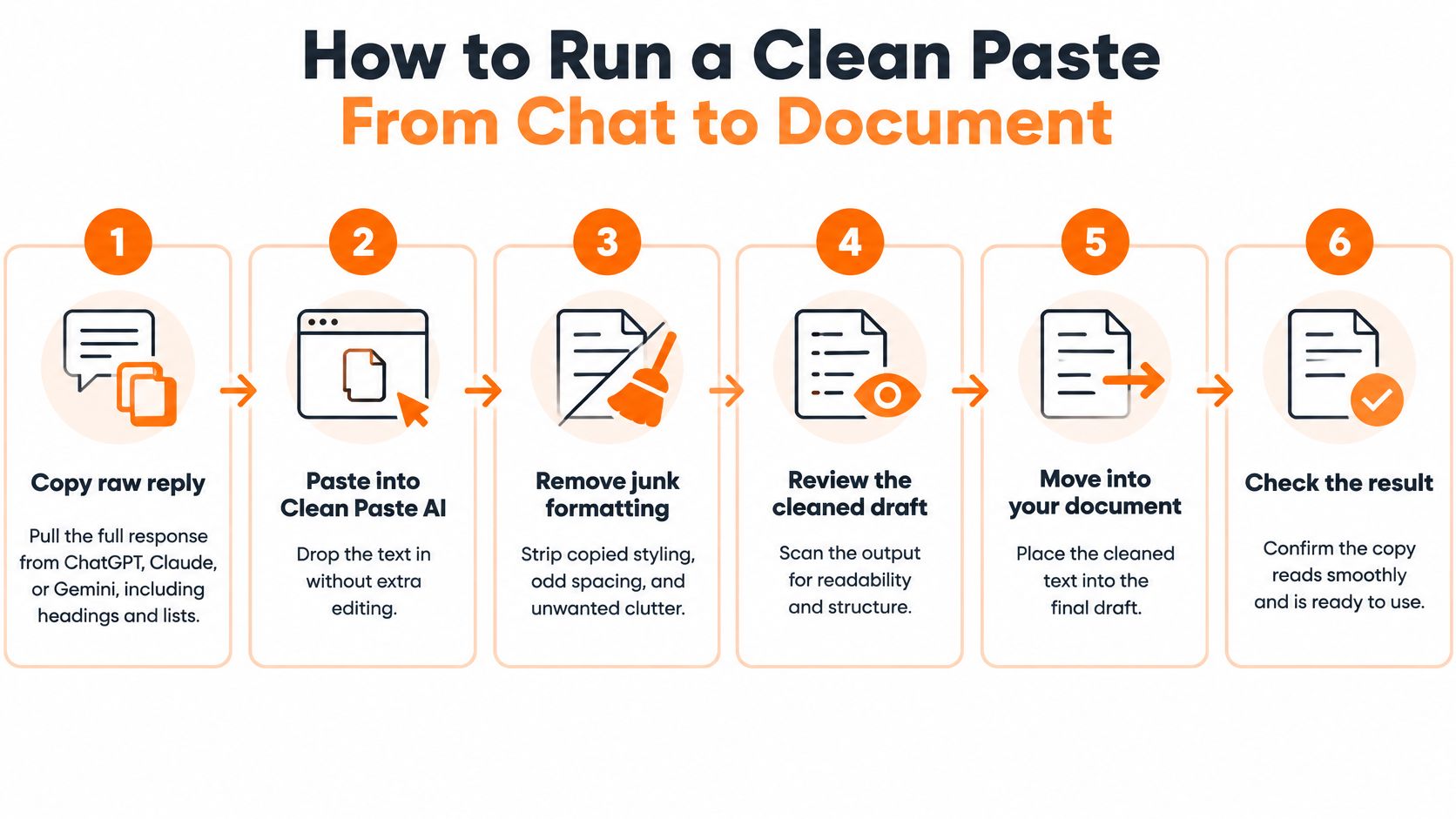
The Clean Paste AI workflow describes pasting raw text, inspecting an itemized residue report, and then choosing artifact removal or semantic reconstruction. Its free detection and Markdown stripping use browser-side JavaScript; reconstruction is a different operation that requires checking the resulting language.
Prepare the text before changing it
-
Copy the raw reply and save an untouched version. Take the response from ChatGPT, Claude, or Gemini, including its headings and lists. Keep the original in a separate file so you can compare claims, punctuation, and structure later.
Don't pass it through Word first just to make it look cleaner. An intermediate application may alter presentation, making it harder to tell which problem came from the original copy and which appeared during the transfer.
-
Paste directly into Clean Paste AI and inspect the report. Separate invisible findings, such as zero-width characters and narrow spaces, from visible syntax, such as hashes, asterisks, and backticks.
Don't treat every flagged symbol as disposable. An asterisk might be a footnote marker, and backticks might surround code that your readers need. Decide what the destination should display before stripping anything.
-
Remove unwanted artifacts on the local path. Use character cleanup when you want the same words without the copying residue. Review the output rather than assuming that a tidy-looking preview guarantees a correct final document.
Pay particular attention to boundaries between words. Removing an unwanted separator should restore the intended name or phrase, not accidentally join words that need a normal space.
Make wording changes only when necessary
-
Choose reconstruction only for sentences that need rebuilding. Keep the original beside the rewritten result and compare the subject, action, qualifications, and conclusions.
Look closely at words such as “may,” “must,” “usually,” and “only.” A change to one of those terms can alter the claim even if the rest of the sentence looks familiar. Restore any qualification the rewrite drops.
-
Send the cleaned text into the next editing step. If you're using a grammar assistant or another AI prompt, give it the cleaned version so clipboard residue doesn't travel downstream.
Keep that next request narrow. Ask for spelling and grammar corrections if that's all you need, rather than inviting a complete stylistic overhaul. Review suggested changes to names, quotations, technical terms, and citations before accepting them.
-
Move the result into its destination and test the failure. Paste into Word, Google Docs, your CMS, or the spreadsheet, then repeat the action that originally failed.
Search for the affected product name. Preview the heading. Retest the lookup. A successful cleanup should solve the practical problem, not merely produce a reassuring report.
For a visual walkthrough alongside your own draft, use this demonstration.
A client-post example
Say a writer copies a Claude section into Word for a client post. The draft includes a heading, an emphasized product name, and a price field that will also go into a spreadsheet.
The heading arrives with a literal hash. Asterisks surround the name, a zero-width space divides that name internally, and a narrow no-break space has slipped into the price string. In this hypothetical example, the intended price is the published plan amount discussed above.
The bracketed labels below make otherwise invisible characters visible for explanation. They aren't literal words in the copied draft.
Before
# Plan details
The **Clean[U+200B]Paste** plan costs $12.[U+202F]90 per month.
The writer can read the name, but a CMS search for the uninterrupted spelling returns nothing. A text-based spreadsheet lookup also fails because the stored price includes an extra character.
After
Plan details
The CleanPaste plan costs $12.90 per month.
The unwanted hash and emphasis markers are gone. The product name is uninterrupted, and the price string matches the intended text. The visible wording hasn't been paraphrased.
There's still a distinction between matching a text string and converting it to a numeric spreadsheet value. If a formula expects a number, check the cell's value and type rather than relying on its appearance.
A successful formatting repair should be easy to explain: these characters changed, and these words stayed the same.
A rewrite would be a separate editorial choice. It might replace the sentence with different phrasing or shift how the price is described, so the writer keeps the original beside the cleaned file and compares before publishing.
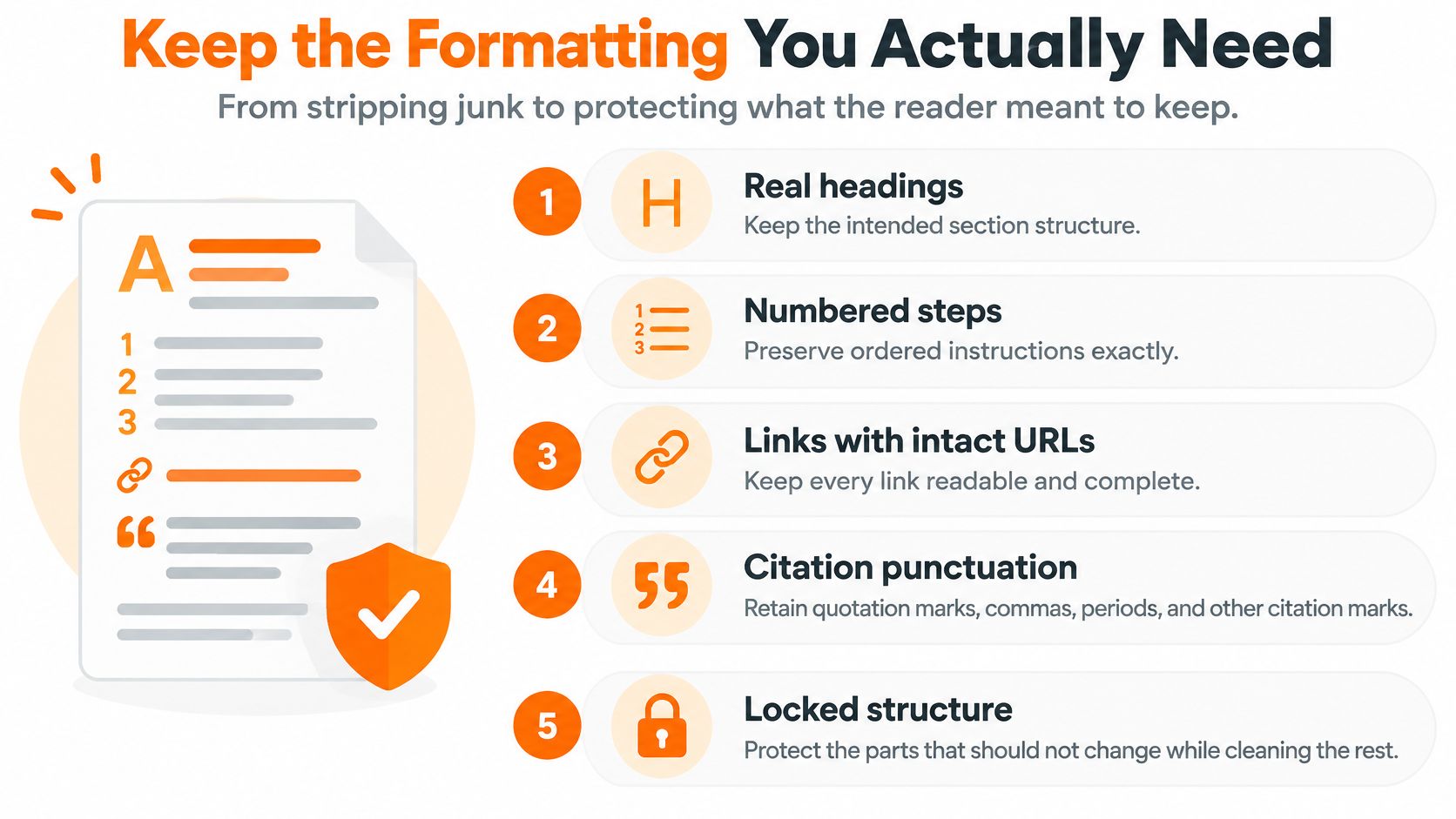
Keep the Formatting You Actually Need
A plain-text result isn't automatically a finished document. Your goal is to remove unwanted residue while preserving the structure readers need: headings, ordered instructions, usable links, citation punctuation, and exact names.
Use this checklist to distinguish intentional structure from copied clutter.
Check the destination's actual behavior
| Destination | What to inspect | What a good result looks like |
|---|---|---|
| Google Docs | Heading styles and lists | Headings use document styles; list items form a real list |
| Microsoft Word | Emphasis and paragraph breaks | Bold is formatting, not asterisks; paragraphs don't contain accidental manual breaks |
| CMS | Title field, slug, and rendered preview | Names remain searchable and the published layout matches your intention |
| Spreadsheet | The failed lookup and cell type | The intended value matches and formulas receive the expected type |
In Google Docs, apply the appropriate heading style rather than enlarging ordinary text until it looks like a heading. Check list behavior by adding an item: the editor should continue the list, not leave you typing numbers manually.
In Word, turn on formatting marks if odd gaps remain. That can help distinguish paragraph breaks, manual line breaks, tabs, and ordinary spaces without guessing from the page layout.
A CMS requires both an editing check and a rendered preview. Inspect the slug separately from the visible title, especially if the system created it before you cleaned the text. Fixing the title doesn't necessarily repair an already saved slug.
Protect meaningful details
Don't remove punctuation indiscriminately. A hash inside a technical example, an asterisk attached to a footnote, or a backtick in code can be content rather than clutter.
Use a short final check:
- Heading: Confirm the first heading's wording and style.
- Link: Open a representative link and compare its destination with the original.
- List: Check order, indentation, and any nested instruction.
- Proper noun: Compare a product, author, or course name character for character.
- Citation: Confirm quotation marks, punctuation, and source details survived.
Read those selected elements aloud against the original when possible. Reading helps catch missing words, while a visual comparison catches punctuation and spelling differences.
For brand-sensitive prose, run a glossary-style review after the strip. Protect approved product names, capitalization, and terminology during any later editing pass. A clean paste should change invisible residue and unwanted syntax, not the claims.
Why a Clean Paste Is Not Academic Clearance
The University of Oklahoma library guide discusses AI-detector limitations, including reported false-positive rates ranging from 15% to 50% depending on the tool, threshold, and writing sample, with particular concerns for non-native English writers. That range isn't a prediction for your paper, and a low score isn't proof of human authorship.
The question for a submission is whether your course permits the assistance you used. A polished document doesn't answer that question, and a detector result doesn't replace an instructor's rule.
Keep a record of the work
Universities may require disclosure of the tools used, their purpose, and how the output was modified. Before submitting, keep a practical audit trail:
- Original material: Save the chat export, your notes, and earlier drafts.
- Cleaned version: Retain the file produced by character cleanup.
- Editing note: Record what was stripped and what was rewritten.
- Checked citations: Verify that each source exists and supports the associated claim.
- Permission: Save relevant instructor guidance or written approval.
For source-based writing, Thesis Book Project's note-taking strategies to prevent plagiarism offer a useful companion habit: keep borrowed ideas connected to their sources while drafting. Don't depend on a final cleanup to reconstruct where a claim originated.
Separate signals from permission
An AI-signal estimate can support a review, but it isn't an authorship verdict. A humanizer serves a different purpose by changing cadence and word choice when that kind of editing is permitted; it doesn't grant permission to use generated content.
Originality is another separate concern. A guide to plagiarism checking can help you review attribution risks, but checking text doesn't replace citing sources or distinguishing quotations from your own analysis.
Reconstruction deserves a human factual review because fluent wording can introduce a new claim, weaken a qualification, or misrepresent a source. Check the rewritten passage against the original references, not just against the previous draft.
Undetectable is not the same as allowed.
Language polishing and undisclosed generation aren't interchangeable. If the course rule is unclear, ask about the specific assistance you intend to use before submitting.
Save the Original and Choose Your Next Tool
What if the paste is clean but still sounds stiff?
The clipboard work is finished; the next task is voice. Decide whether you need clearer sentence structure, a more natural rhythm, or a closer match to your usual wording.
Those goals call for selective editing, not another character scan. Keep your original claims in view and reject changes that make the prose smoother at the expense of accuracy.
What if only spelling or grammar remains?
Use a focused correction pass rather than rebuilding the whole draft. This grammar-checker guide helps separate mechanical corrections from broader rewriting.
Pay special attention to names and specialist vocabulary. A suggested correction can be grammatically plausible and still be wrong for your subject.
Can the cleaned text go straight into an assignment?
Only after you've checked the course rule and completed any required disclosure. Formatting readiness and submission permission are separate decisions.
Clean Paste AI is best treated as a targeted clipboard sanitizer. The writer remains responsible for meaning, sourcing, presentation, and any later wording changes.
Before choosing another tool, finish the handoff:
- Save the original: Keep an untouched comparison copy.
- Keep the cleaned file: Preserve the result before further edits.
- Confirm the destination: Check appearance, search, links, and relevant formulas.
- Choose the next task: Edit for tone only when tone needs attention.
Lumi Humanizer helps make AI-assisted prose sound more natural by refining tone, cadence, and word choice. Once your paste is clean and the intended editing is permitted, visit Lumi Humanizer to work on voice, then compare the result with your original before using it.