You write a product update three ways before your coffee goes cold. The first sounds polished but vague, the second lists every feature, and the third tells users what changed, why it matters, and what to click next. Only the third gets a reply that says, "Got it, done."
That's the true test for the best writing styles. No style wins in every situation. The right one depends on who's reading, what they already know, and what they need to do after the last sentence.
That audience question matters more than a simple readability score. In a study of 1,200 readability judgments, conventional metrics often failed to match human perceptions, and the best traditional metric averaged only seventh among tested approaches, according to the 2025 TSAR workshop proceedings. Shorter isn't always clearer, especially when removing a technical term forces readers to guess at missing meaning.
Use the eight styles below as editing choices, not labels. Plain language gets instructions understood fast. Conversational writing builds trust, academic writing protects evidence, and journalistic writing puts facts first. Narrative, persuasive, technical, and scannable web styles each solve a different reader problem. Pick the one that fits your draft, test the opening sentence, and cut anything that doesn't serve that reader.
1. Plain Language Clear Direct Prose Built for Fast Understanding
Plain language puts one editing decision first. Can a busy reader find the point, understand it, and act without rereading? If not, the sentence needs work, no matter how elegant it sounds.
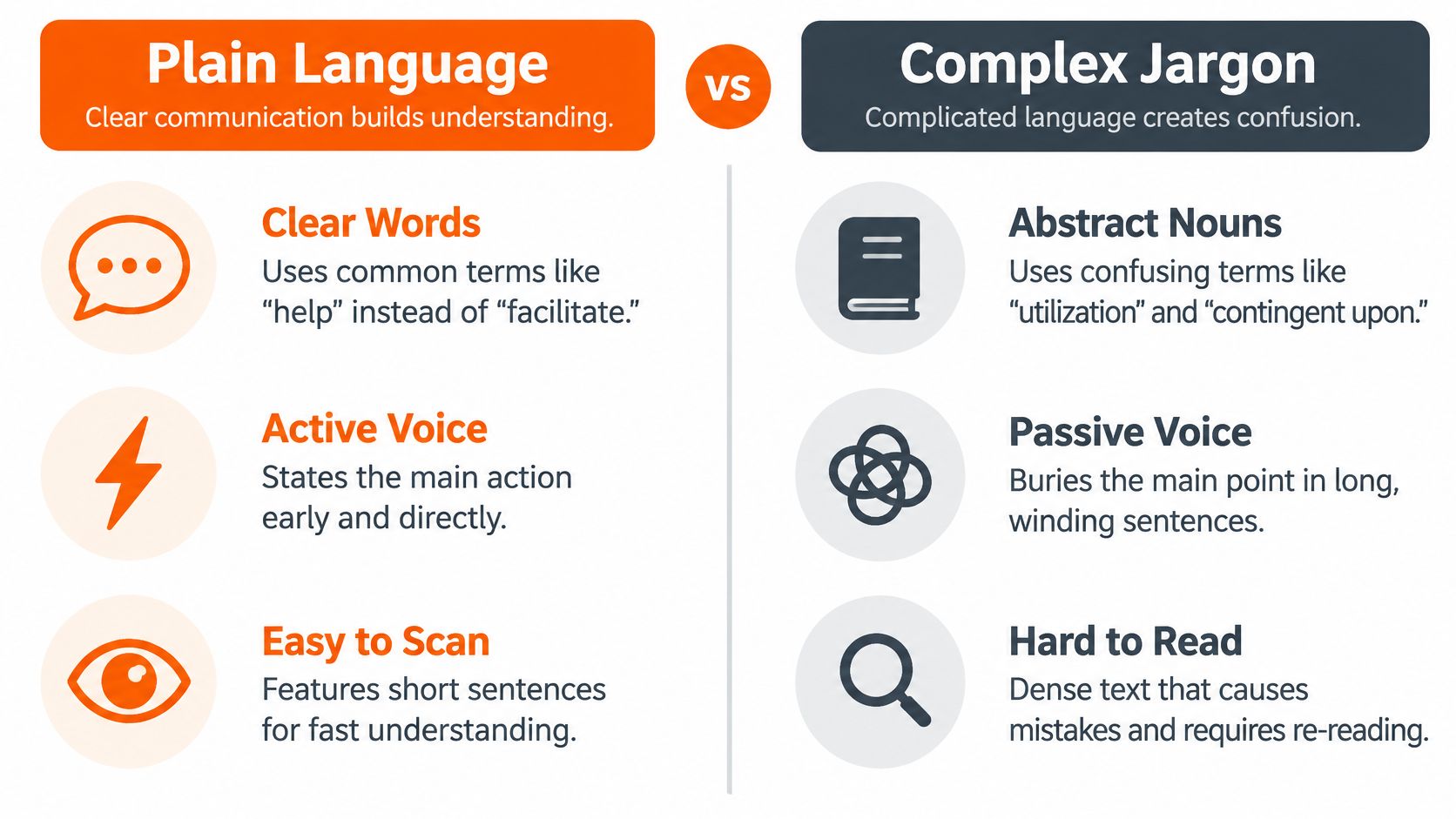
You'll see this style in government forms, healthcare instructions, legal notices, onboarding guides, and customer emails. It uses common words, active voice, and a logical order. It doesn't dumb ideas down. It removes the jargon and padding that stand between the reader and the meaning.
The payoff is measurable. In a randomized trial of one World Health Organization recommendation, plain-language versions produced 19.8 percentage points higher comprehension than standard versions, as reported in the SUNY ResearchConnect trial summary. Readers also rated the plain version higher for accessibility and satisfaction.
The Before and After Test
Before: The utilization of the application is contingent upon the prior submission of documentation.
After: You must submit your documents before you use the app.
The rewrite works because it names the actor, the action, and the order. The US Plain Writing Act of 2010 applies the same logic at scale by requiring federal agencies to write public documents in clear language.
Try this pass on one paragraph today:
- Replace an abstract noun: Change "utilization" to "use" and "submission" to "submit" where the meaning allows.
- Lead with the point: Put the main instruction in the first sentence, not after background.
- Read aloud: Cut any phrase you wouldn't say to a colleague across a desk.
- Watch passive constructions: If the actor disappears, check whether you're misusing passive voice to hide responsibility.
A readability score can flag trouble, but it can't judge whether a real reader follows you. Ask one person to explain the paragraph back. If they can't, simplify the structure before you simplify the ideas.
2. Conversational Style Friendly Direct Writing That Sounds Like a Real Person
Start conversational writing by answering a real person's question out loud, then tighten what you said. That single move gives you natural rhythm without turning the draft into a transcript. You'll keep contractions, short turns of thought, and the word "you."
This style fits blogs, newsletters, product pages, and social posts where trust does part of the work. Readers don't need charm for its own sake. They need to feel that someone specific understands their problem and isn't hiding behind formal filler.
The difference shows up in comprehension too. In a study of scientific abstracts, readers rated traditionally written abstracts at 44.4% readability, while a more accessible and engaging style reached 66.3%, as reported in the Frontiers in Psychology study on accessible scientific writing. Style affected understanding and confidence, not just tone.
A Small Rewrite That Changes the Relationship
Before: It is recommended that users consider reviewing the settings menu.
After: Check your settings first. You may find the fix there.
A small business newsletter can use the same approach. Open with a customer who couldn't find an invoice, show the two clicks that solved it, and end with one clear tip. The story makes it human. The structure makes it useful.
If your draft sounds friendly but a reader can't state your point in one sentence, you're rambling, not conversing.
Keep these checks tight:
- Use you with intent: Address the reader at least once in every section where action or judgement is required.
- Cut empty softeners: Delete "basically," "just," and "really" unless they change the meaning.
- Keep questions honest: Ask only questions you're about to answer.
- Preserve your cadence: Varied sentence lengths sound human. Uniform medium sentences sound generated.
Conversational writing fails when it performs friendliness instead of giving help. Warmth earns attention. Specifics keep it.
3. Academic Style Formal Evidence-Based Writing for Scholarly Audiences
Academic writing asks a harder editing question than "Does this sound formal?" It asks whether every claim can be traced to evidence that another researcher could inspect. Tone follows from that obligation.
Use this style for journal articles, theses, dissertations, and research proposals. It needs precise terminology, careful qualification, and citations placed close to the claims they support. Removing a domain term to sound simpler can reduce accuracy, so define necessary terms instead of replacing them with vague everyday words.
Before: Students use AI and it is bad.
After: Several studies suggest that unsupervised AI use may reduce students' independent drafting skills (Smith, 2023).
The second version doesn't just sound better. It limits the claim, signals uncertainty with "may," and points to a source. A strong literature review does similar work at paragraph level. It groups prior studies by theme, compares their findings, and only then states the gap your work addresses.
Clarity Without Concealing Authorship
Fluency help creates a separate responsibility. A 2025 CHI study found students hid AI use because they feared judgment at 54% and penalties at 44%, according to the ACM study of student AI disclosure. That fear doesn't make concealment good practice. Grammar and sentence revision are different from generating analysis, tables, figures, or substantial manuscript content that your institution may require you to disclose.
Protect the evidence trail as you edit:
- Match the required system: Use APA, MLA, or Chicago exactly as your journal or department specifies.
- Qualify by evidence strength: Write "suggests" for limited findings and reserve "shows" for stronger support.
- Define once, then stay consistent: Introduce each key term clearly and don't rename it later for variety.
- Verify after polishing: Recheck every claim, citation, and number against your notes before submission.
Academic style goes wrong when polish outruns proof. Keep your reasoning visible, follow local disclosure rules, and let the citations carry authority instead of inflated language.
4. Journalistic Style Inverted Pyramid Writing That Leads With the Most Important Facts
Write the first sentence as if everything after it might get cut. That's the journalistic discipline. The lead carries the essential facts, supporting detail follows in descending order, and the reader can stop anywhere without missing the core story.
News articles, press releases, incident reports, and executive updates all benefit from this inverted pyramid. It answers who, what, when, where, why, and how early, using plain attribution instead of personal voice. Accuracy and neutrality matter more than a memorable turn of phrase.
Build From the Lead Down
Lead: The city council approved a $12 million budget for road repairs on Tuesday, officials said.
The next paragraphs can explain funding sources, affected streets, and the timeline. A reader who stops after one sentence still knows what happened and who said so. A product press release should work the same way. Put the launch date and availability first, then specifications, then executive quotes.
This structure also makes editing faster. When you need to shorten a news piece, you cut from the bottom first because the least essential material sits there by design. If cutting the final paragraph destroys the meaning, your order is wrong.
Apply four checks before publishing:
- Test the opening alone: It should read like a complete headline with context, not a teaser.
- Attribute factual claims: Name the person, agency, document, or dataset behind each important assertion.
- Separate fact from interpretation: Put observed events in your voice and opinions inside clear attribution.
- Verify the hard details: Check every name, title, number, date, and quoted word against the source.
Journalistic writing goes wrong when writers bury the result under background or borrow promotional language from a press release. Keep the lead clean. Let later paragraphs earn their space by adding context the reader needs.
5. Narrative Style Story-Driven Writing That Uses Scenes Characters and Tension
Don't begin with background when a moment can carry the reader in. Narrative style makes an idea memorable through a person facing a problem, making choices, and reaching a changed situation. The editing decision is simple. Which scene proves your point, and which scenes only decorate it?
You'll use this approach in essays, memoirs, case studies, brand stories, and long-form features. It creates emotional connection, but it still needs an argument underneath. Without one, readers may enjoy the story and forget why you told it.
Compare two openings for a software case study. "Our software saves time" states a claim. A project manager spending every Friday afternoon building reports, then finishing by lunch after changing tools, shows the claim in a life the reader can picture. The second version gives time a human cost.

Make Each Scene Do Work
A college application essay might open with one failed experiment in a lab. The smell, the ruined sample, and the decision to rerun it can lead naturally into the applicant's research goals. One concrete detail per scene is usually stronger than a catalogue of details competing for attention.
Point of view controls distance as well. If you're writing in first person, it helps to understand how first person narration shapes what readers can know. The narrator's limits become part of the tension, not a flaw to hide.
- Start mid-action: Enter when something is at stake, then supply background in small pieces.
- Keep one clear turn: Show what changes for the person, not just what happens around them.
- State the lesson late: Place your point in one sentence near the end, after the scene has earned it.
- Cut decorative scenes: Remove any episode that doesn't move the story or sharpen the argument.
6. Persuasive Copywriting Benefit-Focused Writing That Moves Readers to Act
Persuasive copy starts with the reader's problem, not your company's history. Your editing job is to connect a specific feature to an outcome the reader already wants, then ask for one action. Anything that doesn't strengthen that chain is a distraction.
Use it on ads, landing pages, email campaigns, proposals, and product pages. Frameworks such as AIDA and PAS can organize the page, but they can't rescue vague claims. Specific, believable benefits persuade. Superlatives and false urgency make careful readers suspicious.
Feature-focused: Our tool has 40 templates.
Benefit-focused: Write your client proposal in 20 minutes using one of 40 ready-made templates.
The second line still names the feature, but time saved comes first. A sales proposal should open the same way. Name the client's bottleneck in the first paragraph, explain the fix, and put pricing after the value is clear.

Earn the Click
Headlines carry much of this burden, which is why it's worth learning to write headlines that convert around a concrete promise you can support. Test two versions when you can. Keep the winner only if the page below it delivers what the headline promises.
For product pages especially, clear product description writing that connects features to use prevents the common spec-sheet problem. Readers rarely buy dimensions alone. They buy what those dimensions let them do.
- Swap praise for proof: Replace "amazing" with a number, timeframe, comparison, or named result.
- Use one call to action: Don't ask readers to buy, subscribe, download, and book a call in the same section.
- Answer the obvious objection: Address price, effort, risk, or fit before the reader has to hunt for it.
- Remove manufactured pressure: If a deadline isn't real, don't invent one.
Practical rule: If you removed your brand name and the copy could describe any competitor, you haven't found the benefit yet.
7. Technical and Instructional Style Precise Step-by-Step Writing for Accurate Action
Technical writing succeeds when a reader completes the task without guessing. That sounds obvious, yet many instructions fail on one missing prerequisite, one renamed button, or one step that contains three actions. Precision here isn't stiffness. It's respect for the person following along.
Use this style in user manuals, software documentation, API references, help articles, and standard operating procedures. Keep terminology consistent, number the steps, and place warnings before the risky action. A stylish variation is a defect if it makes readers wonder whether "Save," "Store," and "Export" mean different things.
From Vague Advice to Followable Steps
Before: The file should probably be saved after the changes are made.
After: 1. Click File. 2. Select Save As. 3. Enter a file name and click Save.
A complete help article adds prerequisites at the top and troubleshooting at the end. Say which version, permission level, or file type is required before Step 1. Readers shouldn't discover halfway through that they're editing the wrong screen.
The short walkthrough below shows why testing the written sequence matters more than trusting your memory of the interface.
Run this quality pass before you publish:
- Keep one action per step: If a step contains "and then," it probably needs splitting.
- Use interface names verbatim: Match button, menu, and field labels exactly every time.
- Put warnings early: Place the warning before deletion, overwrite, payment, or any irreversible action.
- Test carefully: Follow only what's written, with no insider knowledge, and note every place you hesitate.
Ambiguity is the main enemy. "Configure the settings appropriately" tells readers nothing. Name the setting, the value, and the reason when the choice affects the result.
8. Scannable Web Style Short Structured Writing Designed for Skimming
Most web readers decide whether a page deserves attention before they read it closely. Nielsen Norman Group reports that users typically read only about 20–28% of the text on a web page, according to its UX writing guidance on how users read online. Your headings and opening lines therefore aren't decoration. They're the route through the page.
Scannable style uses descriptive headings, short paragraphs, front-loaded answers, and bullets only where a list is easier to scan. It suits blogs, landing pages, documentation, proposals, and SEO articles. The substance still matters. Thin content with tidy headings is still thin content.
Structure has a large measured effect. In Nielsen Norman Group's comparison, concise copy improved measured usability by 58%, scannable formatting by 47%, and combining concise, scannable, objective writing produced a 124% improvement, as reported in its study of concise scannable and objective web writing. Treat that as a usability benchmark, not a promised conversion lift.

Let the Headings Tell the Story
A heading such as "How long does a grant proposal usually take?" should get a direct answer in the first two sentences. Supporting ranges and caveats can follow. If readers scan only your headings and first lines, they should still understand the argument.
Google gives similar structural advice. Its guidance recommends making each title unique, clear, concise, and accurate, as explained in Google Search Central guidance on titles and page structure. Descriptive headings help people find their way around the page, and they also keep your page focused on one real subject.
- Write complete headings: Prefer a useful claim or question over a vague label such as "Overview."
- Answer early: Put the section's main point in the first two or three sentences.
- Limit list length: Three to seven bullets is usually enough before scanning turns into skipping.
- Use the keyword naturally: Don't repeat an exact phrase in every heading at the expense of clarity.
How the eight writing styles differ in use, strength, and trade-off
| Item | Typical Use | Main Strength | Main Trade-off |
|---|---|---|---|
| Plain Language | Forms, instructions, notices, and business communication | Easy to understand and act on quickly | Can feel blunt or oversimplify nuanced ideas |
| Conversational Style | Blogs, newsletters, product pages, and social media | Builds rapport and keeps readers engaged | Can become vague or too casual for formal contexts |
| Academic Style | Journal articles, theses, and research proposals | Supports credible, verifiable arguments | Can be dense and slow to read |
| Journalistic Style | News articles, press releases, and reports | Leads with key facts and clear sourcing | Can feel impersonal or lack context |
| Narrative Style | Essays, memoirs, case studies, and brand stories | Makes ideas memorable and emotionally engaging | Requires careful pacing and may drift from the main point |
| Persuasive Copywriting | Ads, landing pages, email campaigns, and sales proposals | Motivates measurable action | Can feel generic or undermine trust if it overpromises |
| Technical and Instructional Style | Manuals, software documentation, and procedures | Helps readers complete tasks accurately | Can feel dry and overwhelm beginners with detail |
| Scannable Web Style | Blogs, landing pages, and SEO content | Helps readers find answers quickly | Can feel choppy or oversimplify complex topics |
Match the Best Writing Styles to the Reader Before You Edit
Return to that product update with three openings. The version that worked didn't win because it sounded the most professional. It won because it matched the reader's job. Someone deciding whether to click needed the change, the benefit, and the next action in that order.
That's how I'd choose among the best writing styles for any draft. Ask who is reading, what they already know, how much time they have, and what a successful outcome looks like. An executive may need journalistic order for a fast decision. A new customer may need plain language and numbered steps. A researcher may need academic caution because other people will build on the claim.
Readability research has long treated style as something measurable rather than a matter of taste alone. Kitson's foundational study in 1921 compared newspapers and magazines through sentence length, word length, and syllable counts, as described in the ACL Anthology history of readability research. Later textbook analysis found average sentence lengths ranging from 22 to 26 words across sampled editions. Those numbers are useful signals, but they don't replace a reader test.
A Simple Test You Can Run Today
Take one current draft and label its dominant style. Then read only the first sentence of each section. Does that skeleton give the intended reader the right information in the right order?
Next, check the editing decision specific to that style. Plain language needs the instruction up front. Academic writing needs citations attached to claims. Narrative needs scenes that change something. Technical writing needs steps you can follow exactly. Persuasive copy needs one believable benefit and one action.
Styles can also work in layers. Put a plain-language summary above a technical procedure. Open a persuasive proposal with a short narrative problem, then switch to scannable benefits and pricing. Use conversational phrasing inside a journalistic structure when the facts need urgency but the audience dislikes corporate stiffness. Mixing is fine when the reader can still find the point quickly.
Don't ask whether a paragraph sounds impressive. Ask what the reader can now understand, decide, feel, or do because it exists.
A manual review still matters most. Read aloud, verify names and numbers, and ask someone outside your team where they got stuck. Grammar checks, paraphrasing for variation, and originality checks can support that review, but they can't choose the right style for you. That judgement begins with audience, stakes, and purpose.
If you're revising an AI-assisted draft, keep your meaning and evidence intact while you adjust cadence and tone. We built Lumi Humanizer for writers, students, and teams who need that kind of support, with style options for academic, professional, creative, and casual writing. You can also create a custom style from your own examples so a rewrite stays closer to your preferred formality and sentence structure. Always review the final output yourself, especially where citations, disclosure rules, or brand terminology matter.
Start with one page, not your whole archive. Pick the reader, name the style, rewrite the opening, and test whether a real person acts with less friction. That's where better writing stops being theory and becomes a habit you can measure in replies, completed tasks, fewer revision requests, and clearer decisions.
When you're ready to put this into practice, try Lumi Humanizer to revise a rough or AI-assisted draft in an academic, professional, creative, or casual style, or build a custom style from your own writing samples. Paste in your text, choose the audience and tone you need, review the cleaner draft carefully, and keep the final judgement where it belongs, with you.